
Jpg vs jpeg vs png for exam forms What You Need to Know
Understand differences between JPG, JPEG, and PNG formats for exam forms. Learn which format to choose for photos, signatures, and documents under 20KB.
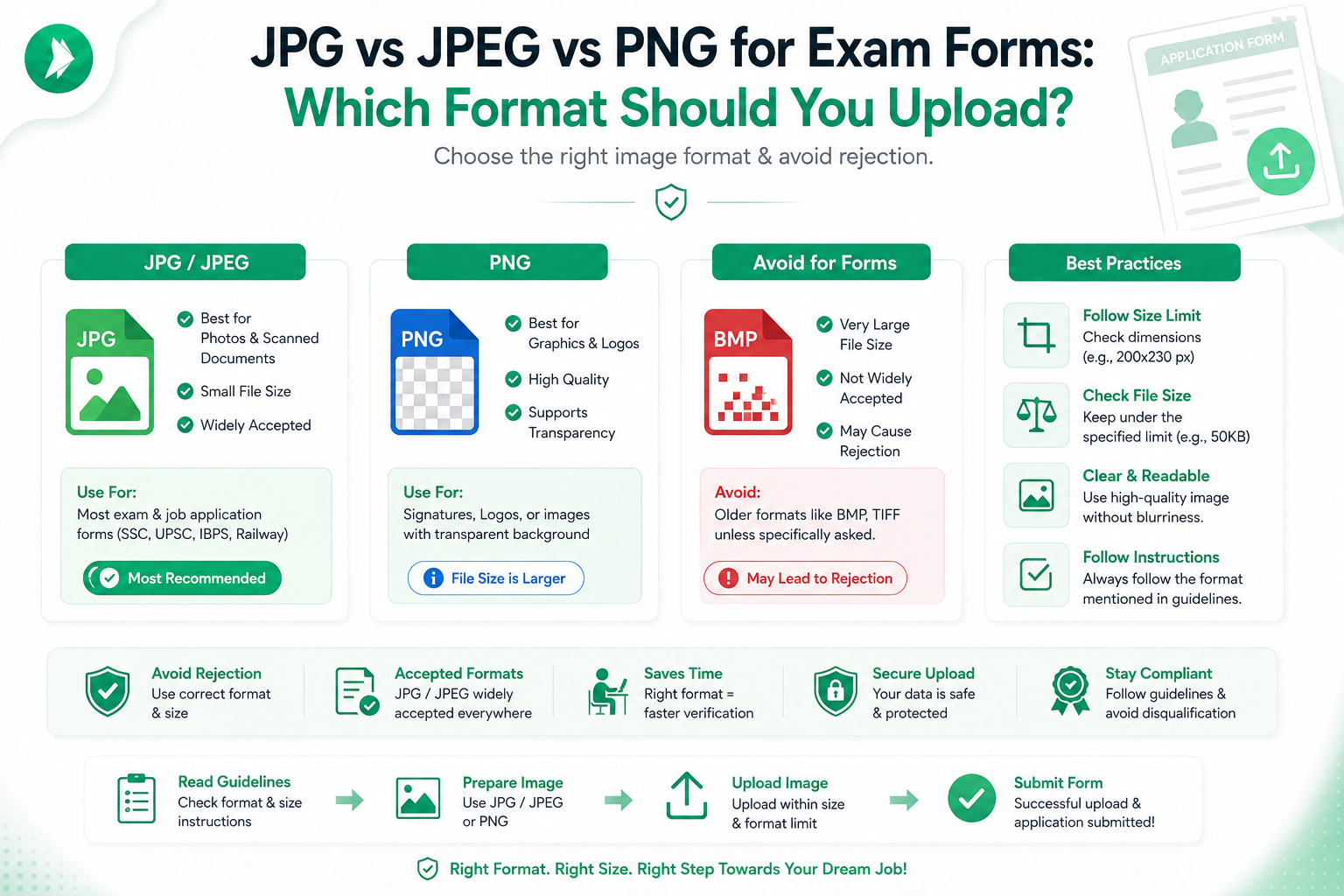
Applying for a competitive test in India often feels like a race against time. One of the most frustrating hurdles is getting your digital documents to meet strict upload requirements.
Many students struggle with the technical differences between file types. Understanding the best jpg vs jpeg vs png for exam forms is essential to ensure your application is accepted without errors.
It is not just about the file extension. You must also consider the specific dimensions, clarity, and strict size limits set by the portal. Using the right tools can save you from unnecessary stress during the submission process.

At ImageTo20KB.com, we help you prepare your exam form images quickly and efficiently. Our platform simplifies the process of compressing and resizing your files to meet exact portal standards.
In this guide, we will walk you through how to choose, convert, and resize your files correctly. You will learn how to verify your documents so you can hit that submit button with total confidence.
Key Takeaways
- Portal requirements often dictate the specific file format you must use.
- File size limits are just as important as the image extension.
- Always check the required dimensions before uploading your documents.
- ImageTo20KB.com provides a fast way to compress files to meet strict limits.
- Proper preparation prevents common upload errors on Indian application sites.
Why Image Format Matters for Indian Exam Forms
Getting your digital files right is essential for ensuring your exam form submission goes through without a hitch. Many candidates focus entirely on the data they enter, but the technical side of the application is equally critical for success.
"Precision in preparation is the bridge between a rejected application and a successful registration."
How application portals validate uploaded images
Indian exam portals use automated systems to verify every file you upload. These systems check the image file formats to ensure they match the specific requirements listed in the official notification.
Beyond the extension, the portal scans the actual image content to confirm it is readable. If the file is corrupted or uses an unsupported encoding, the system will immediately flag it as invalid.
Why format, dimensions, and file size work together
A common mistake is assuming that a file is acceptable just because it has the right extension. Even if you use the correct image file formats, your upload might still fail if the pixel dimensions or aspect ratio are incorrect.
Portals often enforce strict limits on the maximum file size to keep their servers running smoothly. Once you have confirmed the authority’s technical requirements, you can use ImageTo20KB.com to resize your files accurately without losing necessary detail.
Common upload problems faced during exam form submission
Candidates frequently encounter technical hurdles that prevent their exam form images from being accepted. These issues often stem from a lack of attention to the fine print in the application guidelines.
- Uploading files with unsupported extensions that the portal cannot recognize.
- Submitting images that exceed the maximum allowed file size.
- Using photos with distorted proportions due to incorrect aspect ratios.
- Uploading blurry or unclear exam form images that fail to meet identification standards.
By addressing these technical details early, you ensure that your application remains professional and compliant. Taking the time to verify your files before clicking the submit button saves you from unnecessary stress during the final hours of the application window.
jpg vs jpeg vs png for exam forms: The Basic Difference
Understanding the technical differences between image file formats is vital for a smooth exam application process. When you prepare your documents for Indian exam portals, you will often encounter strict requirements regarding the file type. Knowing how these formats function helps you avoid common errors that lead to rejected applications.
What JPG and JPEG mean
In the digital world, JPG and JPEG are simply two different extensions for the exact same image format. The term JPEG stands for Joint Photographic Experts Group, which is the organization that created the standard. Because early computer systems only allowed three-letter file extensions, the format was shortened to JPG, while modern systems often use the full JPEG extension.
How PNG stores image data
Unlike the JPEG format, PNG (Portable Network Graphics) uses a different method to store image data. It is designed to preserve high-quality details and supports transparent backgrounds, which makes it popular for web graphics. However, this extra data often results in larger file sizes compared to compressed images, which can be a disadvantage when portals have strict size limits.
Why JPG and JPEG are usually treated as the same format
Most exam portals treat JPG and JPEG as identical because they share the same underlying compression technology. If a portal asks for a JPEG file, a file ending in .jpg will almost always be accepted without any issues. You can rely on image file compatibility between these two extensions for almost every major Indian examination system.
File extensions accepted by common upload systems
Exam portals typically list the specific extensions they support in their official notification. It is important to check these rules carefully before you begin your upload. The following table summarizes how these formats generally compare for your application needs:
| Format | Best Use Case | Compression | Compatibility |
|---|---|---|---|
| JPG/JPEG | Photographs | Lossy | High |
| PNG | Signatures | Lossless | Moderate |
| Documents | Variable | High |
When an extension change does not convert an image
A common mistake is manually renaming a file extension, such as changing a .png file to .jpg by typing over the name. This action does not actually convert the internal data structure of the image. If a portal requires a specific format, simply renaming the file will likely cause an error during the upload process.
To ensure your files are truly compatible, you should use a reliable tool like ImageTo20KB.com to properly convert and compress your images. By preparing a genuinely permitted file format before you start the upload, you save time and prevent technical frustrations. Always verify that your final file meets the portal's requirements to ensure a successful submission.
JPG for Exam Forms: Strengths and Limitations
If you are wondering why most exam portals prefer JPG, the answer lies in its unique balance of size and compatibility. Choosing image format wisely is the first step toward a stress-For Free application process for any competitive exam in India.
Why JPG is widely accepted by Indian exam portals
Most official Indian government and recruitment websites are built to handle standard file types. Because JPG is a universal standard, it ensures that your photograph or signature will render correctly on the server. This broad compatibility minimizes the risk of technical errors during the upload phase.
How JPG compression reduces upload size
Exam portals often enforce strict file size limits, such as 20KB or 50KB. A compressed JPG allows you to shrink large high-resolution files into a manageable size without losing the core visual data. This efficiency is exactly why it remains the preferred format for millions of applicants.
Why JPG works well for photographs and signatures
The format is highly effective for continuous-tone images like a jpg exam photograph. It manages colors and gradients smoothly, which keeps your face recognizable while keeping the file size low. Similarly, it works well for signatures, provided the background is clean and the lighting is consistent.
Image quality loss after repeated saving
It is important to remember that JPG uses lossy compression. Every time you open and save the file, the software discards a small amount of data. Avoid saving the same file multiple times to prevent the image from becoming grainy or pixelated.
Blurred text, edges, and fine details
Excessive compression can lead to artifacts, which are small visual distortions. This often results in blurred text or fuzzy edges around your signature. To maintain clarity, use tools like ImageTo20KB.com only after you have finished cropping and resizing your image to the exact dimensions required.
When JPG is the safest choice
You should prioritize this format whenever an official notification explicitly lists it as a permitted extension. It is the most reliable path to a successful submission. When you need to balance quality with strict portal limits, a compressed JPG is almost always the safest choice.
| Feature | JPG Performance | Best Use Case |
|---|---|---|
| File Size | Highly Efficient | Strict upload limits |
| Compatibility | Universal | All Indian exam portals |
| Detail Retention | Moderate | Photographs and signatures |
JPEG for Exam Forms: Is It Different From JPG?
If you are preparing for an Indian exam, you have likely noticed that portals sometimes use the terms JPG and JPEG interchangeably. Many applicants feel uncertain about choosing image format options when both extensions appear in the instructions. It is important to know that these two terms refer to the exact same underlying technology.
JPG and JPEG quality comparison
The visual quality of your photograph or signature does not depend on whether your file ends in .jpg or .jpeg. Instead, quality is determined by your original image resolution, the dimensions you choose, and the level of compression applied.
High-quality results come from starting with a clear image and using reliable tools to manage the file size. Whether you use a three-letter or four-letter extension, the internal data structure remains identical.
Why both extensions use the same underlying image format
The difference between these two extensions is purely historical. In the early days of computing, some operating systems only supported three-letter file extensions, which led to the popularization of .jpg.
"The JPEG format is a standard method of lossy compression for digital images, and the extension used is simply a label for the same digital architecture."
Which extension exam portals usually accept
Most modern Indian exam portals are flexible and will accept either extension without issue. However, you should always prioritize the specific instructions provided by the exam board.
Checking the exact requirements in an official notification
Always read the official notification carefully before you upload your files. If the portal explicitly requests a specific format, follow that instruction to ensure image file compatibility. If the portal is vague, either extension will typically work perfectly.
Renaming a file versus converting a file
Be careful not to simply rename a file extension, such as changing a .png to a .jpg manually. This does not change the internal data structure and can lead to errors during the upload process. You must use a proper conversion tool to ensure the file is correctly encoded as a JPEG exam forms compatible file.
When choosing JPEG can prevent compatibility issues
If you encounter errors, using a standard JPEG extension can sometimes resolve minor system glitches on older portals. To ensure your file meets all technical criteria, you should use ImageTo20KB.com to compress and format your image correctly.
- Always verify the file size limits before uploading.
- Use professional tools to maintain image clarity.
- Ensure your final file matches the portal's requested dimensions.
PNG for Exam Forms: When It Helps and When It Hurts
When you are choosing image format for your exam application, you might wonder if PNG is a viable alternative to the standard JPG. While many portals prefer compressed formats, PNG offers unique technical advantages that can be useful in specific situations.
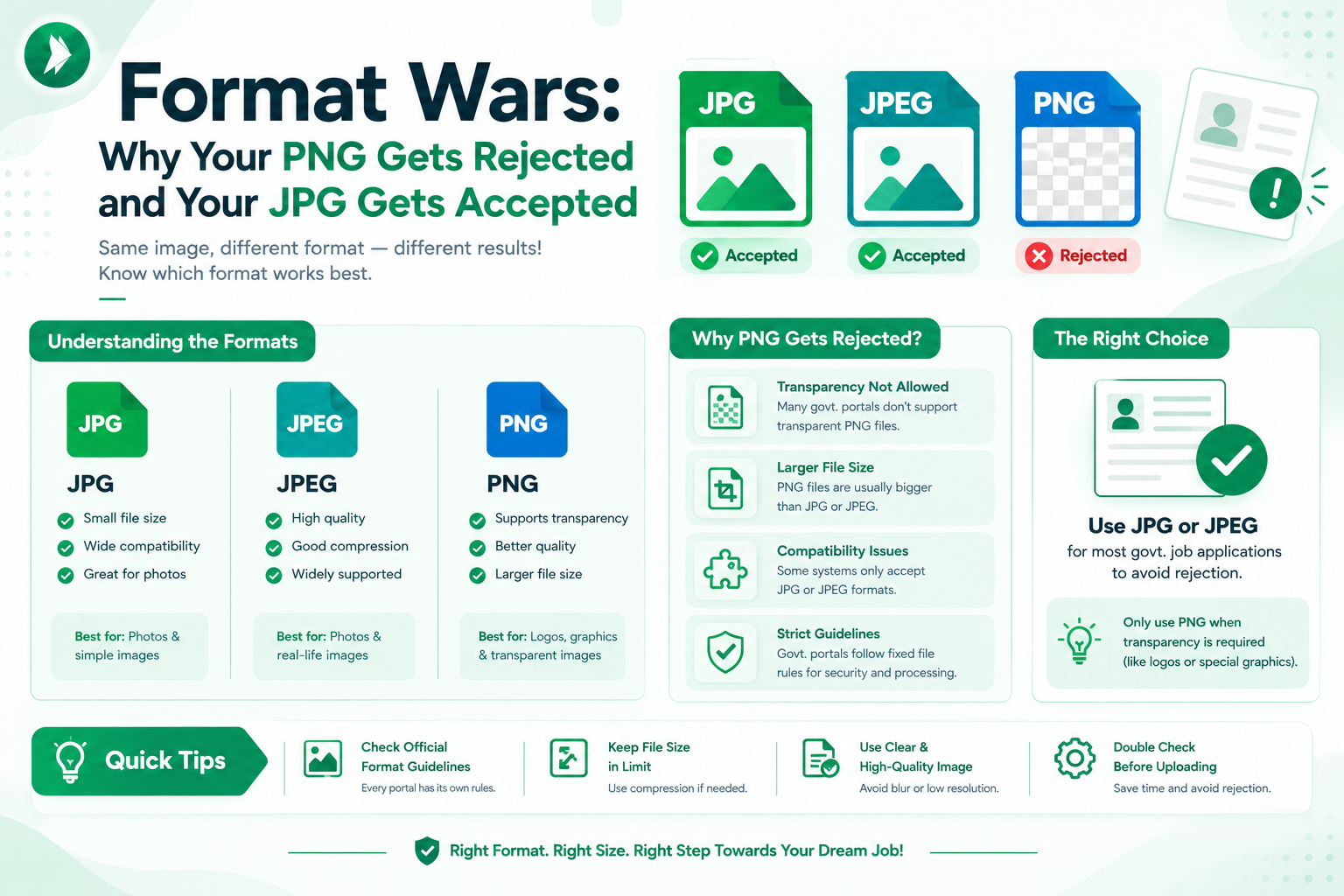
Why PNG preserves sharp edges and transparent backgrounds
The primary strength of the PNG format is its ability to maintain high-quality detail without losing clarity. It is a lossless format, meaning it preserves sharp edges on text and line art perfectly.
This makes it an excellent choice for digital signatures or logos where crisp lines are necessary. Additionally, it supports a transparent background, which allows the image to blend seamlessly with different web layouts.
Why PNG files can be larger than JPG files
Because PNG files do not use aggressive compression, they often result in larger file sizes. This can be a significant drawback when you are working with strict upload limits on Indian exam portals.
Photographs, in particular, contain thousands of colors and complex details that cause PNG files to balloon in size. If your file exceeds the portal's limit, you may need to use a tool like ImageTo20KB.com to compress the image while maintaining its integrity.
Problems caused by transparency in photographs and signatures
While transparency is a powerful feature, it often creates unexpected issues during the upload process. Many exam systems are designed to process standard rectangular images with solid backgrounds.
How transparent pixels may appear on upload
When a portal does not support transparency, it may render those pixels as black or gray blocks. This can make your photograph or signature look unprofessional or even unreadable to the examiner.
Why a white background is often more reliable
Using a solid white background is the safest way to ensure your image displays correctly across all platforms. It provides a consistent look that prevents the system from misinterpreting your file data.
"Simplicity is the ultimate sophistication when it comes to digital document submission, as it minimizes the risk of technical rejection."
Situations where PNG may be suitable
You should consider using PNG exam images only when the official notification explicitly permits them or when you need to preserve specific graphic details. If you find that your PNG file is too large for the portal, remember that you can visit ImageTo20KB.com to optimize the file size effectively.
- Use PNG for signatures with very thin, delicate strokes.
- Always check the portal's guidelines before choosing this format.
- Convert to a white background if the portal displays transparency errors.
Comparing JPG, JPEG, and PNG for Exam Upload Requirements
Navigating the technical requirements of Indian exam portals often starts with selecting the correct image format. While many applicants focus only on the file size, the underlying structure of your file plays a major role in whether your upload is accepted. Understanding the nuances of jpg vs jpeg vs png for exam forms is the first step toward a successful submission.
https://www.youtube.com/watch?v=NV0BfQbosvo
Format comparison for photographs
Photographs require a balance between color depth and file size. JPG is the industry standard here because it handles complex color gradients in human faces very efficiently. Most portals prefer this format because it keeps the file size manageable while maintaining enough detail for identification purposes.
Format comparison for signatures
Signatures are different because they rely on sharp, high-contrast lines. While JPG is often used, it can sometimes introduce "noise" or blurriness around the ink strokes. If the portal allows it, PNG is excellent for keeping those thin lines crisp and clear against a white background.
Format comparison for certificates and scanned documents
When uploading certificates, readability is your top priority. You need to ensure that every word of text remains legible after the file is compressed. Using image file formats that support high-quality compression is vital to ensure that the document does not become pixelated or blurry during the upload process.
Quality, compression, and compatibility trade-offs
Every format comes with specific trade-offs regarding how it handles data. JPG uses lossy compression, which is great for shrinking files but can reduce quality if pushed too far. PNG uses lossless compression, which keeps quality high but often results in much larger file sizes that might exceed portal limits.
| Format | Best Use Case | Compression Type |
|---|---|---|
| JPG/JPEG | Photographs | Lossy |
| PNG | Signatures/Logos | Lossless |
| PDF/JPG | Certificates | Variable |
Best format when the portal gives a strict size limit
When a portal enforces a very strict limit, such as under 20KB, JPG is almost always the best image format to choose. Its ability to discard unnecessary data allows you to meet these tight constraints without losing the core identity of your photograph. You can use ImageTo20KB.com to fine-tune your file size precisely to meet these requirements after you have cropped and resized your image.
Best format when clarity is the main concern
If the portal instructions allow for larger file sizes and you are worried about text clarity, PNG is a strong contender. It preserves the sharp edges of your signature or document text perfectly. Always prioritize the official notification from the exam authority, as their specific rules should always override general preferences.
How to Read an Indian Exam Portal’s Image Instructions
Understanding the specific image guidelines is the most critical step in your exam form submission process. Before you even think about editing your files, you must locate the official notification document provided by the exam authority. This document acts as the final word on what the system will accept.
Finding permitted formats in the official notification
Most portals explicitly state whether they require JPG, JPEG, or PNG files. You should look for a section titled "Instructions for Uploading Documents" or "Technical Specifications." Ensuring image file compatibility early on prevents the frustration of seeing an "Invalid File Format" error message later.
Checking minimum and maximum file size
Exam authorities often set strict boundaries for file sizes, such as "between 20KB and 50KB." If your file is too small, it may appear blurry; if it is too large, the server will reject it. Once you have confirmed these limits, you can use ImageTo20KB.com to process your files to the exact size required.
Confirming required pixel dimensions and aspect ratio
Beyond file size, portals often demand specific pixel dimensions, such as 200x230 pixels. The aspect ratio is equally important to ensure your face or signature does not look stretched or squashed. Always verify these numbers before you start cropping your images.
Understanding separate rules for photographs, signatures, and documents
It is common for an exam portal to have different rules for different types of uploads. For instance, a photograph might need a white background, while a signature must be in black ink on white paper. Always treat these as separate requirements to avoid disqualification.
Examples from recruitment, entrance, and university application portals
Different organizations have varying standards. For example, a UPSC recruitment portal might have different official exam image requirements compared to a state-level university entrance exam. You cannot assume that a setting that worked for one application will work for another.
Why unofficial instructions should not replace the exam authority’s rules
While blogs and social media posts offer helpful tips, they should never override the official notification. Always prioritize the information found on the official website. Use external tools only after you have confirmed the specific rules for your current application.
| Document Type | Common Format | Typical Size Limit |
|---|---|---|
| Passport Photograph | JPG/JPEG | 20KB - 100KB |
| Digital Signature | JPG/PNG | 10KB - 30KB |
| Educational Certificates | PDF/JPG | 100KB - 500KB |
Choosing the Best Image Format for Your Exam Photograph
When preparing your documents for Indian exam portals, choosing the best image format can save you from unnecessary stress. While many options exist, the official notification remains the final authority on what you must upload. Always prioritize the specific guidelines provided by the exam board to ensure your application is accepted without delay.
Why JPG is usually the practical choice for photographs
For most candidates, JPG is the most reliable format for exam form images. It offers a perfect balance between high visual quality and small file size, which is essential for meeting strict portal limits. Because it is universally supported, you are unlikely to face compatibility errors when uploading your photo.
How lighting and background affect the final upload
Before you even think about file formats, ensure your photograph is taken under even lighting. Harsh shadows across your face can lead to rejection by automated verification systems. A plain, light-colored background is also standard practice to keep the focus entirely on you.
How to preserve facial detail after compression
Compression is necessary to meet file size limits, but it can sometimes degrade image quality. To maintain clarity, use a tool like ImageTo20KB.com to manage your file size effectively. This allows you to keep the file small while ensuring your facial features remain sharp and recognizable.
Keeping the face centered and clearly visible
Your face should occupy the majority of the frame, looking directly into the camera. Avoid tilting your head or using wide-angle shots that distort your features. A centered, clear photograph is the gold standard for any official identification document.
Avoiding filters, heavy retouching, and excessive sharpening
Resist the urge to use beauty filters or aggressive editing software. These tools often create visible artifacts or unnatural skin textures that can cause an application to be flagged. Stick to a natural, professional appearance to ensure your identity is easily verified.
When PNG may be useful for a specific portal requirement
While JPG is the industry standard, some portals may explicitly request or accept PNG files. You should only use this format if the official instructions mention it as a permitted option. Otherwise, stick to the format that the portal confirms will work best for their system.
| Format | Best Use Case | Compression | Compatibility |
|---|---|---|---|
| JPG | Standard Photos | Excellent | Universal |
| JPEG | Standard Photos | Excellent | Universal |
| PNG | Specific Portals | Limited | Variable |
Choosing the Best Format for an Exam Signature
When you prepare your documents for an application, choosing image format settings is a critical step. A signature is often the most delicate part of your file, as it requires high clarity to remain valid for verification. Selecting the right file type ensures that your identity is clearly represented on the portal.
Why a clean JPG signature is commonly accepted
Most Indian exam portals prefer JPG files because they are compact and universally compatible. This format handles the color data of a signature efficiently, making it easy to upload without exceeding strict size limits. Because it is so widely supported, you rarely face technical errors when submitting a standard JPG file.

When PNG can preserve thin strokes more clearly
While JPG is the standard, you might consider PNG if the portal guidelines explicitly allow it. PNG is excellent at preserving fine details, such as the thin, sharp strokes of a pen. If your signature has very intricate loops or light pressure marks, this format helps keep those lines from blurring during the compression process.
How paper texture, shadows, and background color affect signatures
The quality of your digital signature depends heavily on the physical conditions of your original document. Paper texture, uneven shadows, and poor lighting can create "noise" that makes the signature look messy or unprofessional. These elements often become more pronounced when you resize the image for an exam form.
Scanning or photographing a handwritten signature
To get the best results, place your paper on a flat, well-lit surface. Avoid using a flash, as it creates harsh glare and shadows that distort the ink lines. A clean, high-contrast scan is always better than a quick photo taken in a dim room.
Removing unnecessary empty space without cutting off strokes
Once you have your image, you must crop it to remove excess white space around the edges. Be careful to keep the entire signature intact, as cutting off even a small stroke can lead to rejection. After you have perfected the composition, you can use ImageTo20KB.com to compress the file to the required size without losing legibility.
Keeping the signature recognizable after resizing
Always verify that your signature remains readable after you have adjusted the dimensions. If the lines become too thin or pixelated, the automated systems used by exam boards may struggle to process your application. Following these simple steps ensures your exam form images meet all technical standards:
- Use a black or dark blue pen on plain white paper.
- Ensure the signature is centered within the frame.
- Check that the final file is clear and For Free of background shadows.
- Use ImageTo20KB.com to balance file size and visual quality.
Image File Size, Dimensions, and Quality Explained
Your exam application success often hinges on how well you manage your image files before clicking submit. While it might be tempting to shrink every file to the smallest possible size, this approach can actually lead to rejection by automated systems.
Why a small file is not always a better file
Reducing an image to an extremely small file size often strips away vital information. You might notice that facial features become muddy or the edges of your signature appear jagged and unclear.
When you over-compress, the software loses the fine details required for identity verification. Maintaining clarity is just as important as meeting the file size limit set by the exam board.
How pixel dimensions affect clarity and upload limits
Pixel dimensions determine the physical size of your image on the screen. If your dimensions are too low, the image will look blurry or pixelated when viewed by an examiner.
Conversely, an image with massive dimensions might look sharp but will likely exceed the portal's upload limit. Finding the right balance ensures your exam image quality remains high while staying within the technical constraints of the application portal.
How compression changes visual quality
Effective image compression is a delicate process that requires the right tools. Without proper control, you risk damaging the integrity of your scanned documents or photographs.
Low-quality compression and visible artifacts
Aggressive compression often introduces unwanted visual noise. You may see blockiness, halos around text, or a general loss of sharpness that makes your documents look unprofessional.
Oversized images that fail portal limits
Even if your photo looks perfect, it might be rejected if the file size is too large. Portals often have strict caps, and failing to meet these will prevent your application from moving forward.
Balancing readability, appearance, and technical requirements
The goal is to provide a clear, readable file that meets all specific criteria. You can achieve this by optimizing image files after you have finished cropping and resizing them to the correct aspect ratio.
Using a dedicated tool like ImageTo20KB.com allows you to maintain the necessary visual quality while ensuring your file size fits perfectly within the portal's requirements. This simple step ensures your documents are both professional and compliant.
Compressing Exam Form Images With ImageTo20KB.com
If you are struggling to meet strict upload limits for your documents, ImageTo20KB.com is designed to simplify the process. Many students find that their high-resolution photos are simply too large for portal requirements, which is where specialized tools become essential for a successful exam form submission.
How ImageTo20KB.com helps reduce image file size
This platform acts as your dedicated online resource for optimizing image files without sacrificing the clarity needed for identification. By using advanced algorithms, it strips away unnecessary metadata while keeping your photograph or signature recognizable to examiners.
Preparing a JPG, JPEG, or PNG before compression
Before you upload your file to the compressor, you must perform the necessary manual edits. First, crop out any unwanted background areas to ensure the focus remains on your face or signature. Next, resize the image to the specific pixel dimensions requested by the official notification.
"The secret to a perfect upload is ensuring your file meets all technical criteria before you even think about hitting the submit button."Using the compressed file for an exam application
Once your image is ready, you can proceed to the final steps of your exam form submission. Following a structured workflow ensures that you do not encounter errors during the final upload phase.
Checking the output extension and final file size
After the tool processes your image, verify that the output extension matches the portal's requirements. You should also confirm that the final file size falls safely within the permitted range, such as under 20KB or 50KB, depending on the specific exam guidelines.
Saving the processed file with a clear filename
Always save your file with a descriptive name, such as "Candidate_Photo_Final.jpg," rather than a random string of numbers. This simple habit helps you avoid confusion when you are ready to attach the document to your application.
Why compression should happen after cropping and resizing
It is vital to remember that optimizing image files should always be the final step in your workflow. If you crop or resize an image after it has been compressed, you risk losing quality or altering the file size again. By finalizing your composition first, you ensure that the final result is exactly what the portal expects.
Process Step Action Required Goal Cropping Remove excess background Focus on subject Resizing Adjust pixel dimensions Meet portal standards Compression Use ImageTo20KB.com Reduce file size Verification Check file properties Ensure compatibility
How to Prepare an Image Before Uploading It
Getting your files ready for an exam portal requires a specific, reliable sequence of actions. By following a logical workflow, you can ensure that your exam form images meet all technical standards without unnecessary stress.
Crop the image to the required composition
Start by removing any unnecessary background or empty space from your photograph or signature. Use a simple photo editor to crop the image so that it focuses strictly on the required subject matter. This step ensures that your final file remains clear and professional.
Resize it to the portal’s requested dimensions
Once you have the right composition, adjust the pixel dimensions to match the official guidelines. Precision is key here, as portals often reject files that are too large or too small. Properly optimizing image files at this stage prevents distortion during the final upload.

Convert the image to the permitted format
Check the official notification to see which file types are allowed. If your file is in an unsupported format, you must change it to meet the portal's requirements.
Converting PNG to JPG when the portal does not accept PNG
Many Indian exam portals prefer JPG files over other formats. If you have a file in PNG format, you may need to perform a PNG to JPG conversion to ensure compatibility. This process helps you avoid common technical rejection errors.
Retaining the original file before conversion
Always keep a high-quality copy of your original image before you start the conversion process. If the PNG to JPG conversion results in a loss of quality, you can always go back to the source file. Having a backup is a smart way to protect your data.
Compress the finished file without making it unreadable
After you have cropped, resized, and converted your image, you likely need to reduce the file size. You can use ImageTo20KB.com to compress your file effectively while maintaining visual clarity. This tool is perfect for ensuring your document fits within the strict size limits set by exam authorities.
Review the file on a phone and computer before submission
Before you finalize your application, take a moment to open the file on both a mobile device and a desktop computer. This simple check confirms that the image is legible and correctly oriented. Taking these extra steps will help you submit your exam form images with total confidence.
Common Mistakes During Exam Form Image Uploads
Even the most prepared candidates sometimes face unexpected hurdles when uploading their documents. A smooth exam form submission depends on meeting specific technical criteria that portals demand. When these standards are not met, the system may trigger an automatic rejection, causing unnecessary stress.
Uploading the wrong file extension or an unsupported format
Many portals strictly require specific formats like JPG or PNG. If you attempt to upload a file in an unsupported format, the portal will likely display an error message. Always double-check the official notification to ensure your file matches the requested extension.
Submitting a file that exceeds the size limit
Large files are a frequent cause of upload failures. Portals often set strict caps, such as 20KB or 50KB, to manage server traffic. Optimizing image files before you attempt to upload them is essential to stay within these limits.
Using a blurry, dark, or incorrectly cropped photograph
Your photograph serves as your identity verification. If the image is blurry, poorly lit, or cropped in a way that obscures your face, the authorities may reject your application. Ensure your photo is clear, well-lit, and follows the specified aspect ratio.
Uploading a signature with excess background or missing strokes
Signatures must be legible and clean. Avoid uploading images with heavy shadows or excessive white space around the signature. If your scanning process cuts off parts of your signature, the system may flag it as incomplete.
Changing a filename without actually converting the image
A common misconception is that simply renaming a file extension—such as changing ".png" to ".jpg"—will convert the file. This action does not change the underlying data structure of the image. You must use a reliable tool to perform a genuine conversion.
Why file renaming does not change image compatibility
Renaming a file only changes the label, not the internal encoding. If the portal checks the file header for image file compatibility, it will immediately detect that the format remains unchanged. This leads to errors because the software cannot read the file as intended.
How to verify a real conversion before submission
To ensure your file is ready, use a dedicated tool like ImageTo20KB.com to process your images correctly. After using such tools for optimizing image files, always open the final file on your device to verify its quality. Never rely solely on the filename; checking the actual image ensures your exam form submission proceeds without technical hitches.
A Practical Pre-Submission Checklist for Indian Exam Forms
Before you hit the submit button, follow this essential exam form checklist to ensure your images meet all portal standards. Taking a few extra minutes to review your files can save you from the frustration of rejected applications.
Verify the official format requirement
Always double-check the official notification for the specific file extensions allowed. Most portals strictly require JPG or JPEG, while some might accept PNG. Using the wrong format is a common reason for immediate system rejection.
Confirm file size, dimensions, and aspect ratio
Check that your file falls within the specified minimum and maximum size limits. Ensure the pixel dimensions and aspect ratio match the portal's image upload requirements exactly to prevent distortion or cropping issues during the final processing.
Check that the photograph or signature is clear
Take a moment to inspect your files for blurriness, shadows, or poor lighting. A clear, high-quality image is essential for your identity verification. If the text or facial features are not sharp, consider retaking the photo before proceeding.
Open the final file before uploading it
Never assume a file is correct without viewing it first. Open the final version on your device to confirm that it displays properly and that no data was lost during the saving process.
Keep an original copy and a compressed copy
It is a smart practice to maintain an unedited original file alongside your compressed version. By using ImageTo20KB.com, you can easily create a version that meets size limits while keeping your source image safe for future adjustments.
Use a descriptive filename without confusing symbols
Rename your files to something simple like "Photo_Name.jpg" or "Signature_Name.jpg." Avoid using special characters or spaces, as these can sometimes cause errors during the exam form submission process.
Store the final files where they can be found quickly
Organize your documents in a dedicated folder on your computer or phone. Having your files ready in one place makes the final upload step much smoother and less stressful.
Complete the upload before the application deadline
Do not wait until the final hours to submit your application. Completing your exam form checklist early gives you enough time to resolve any unexpected validation errors, ensuring your application is processed without any last-minute panic.
Conclusion
Navigating the technical requirements for your documents is a vital step in your journey toward a successful exam form submission. Understanding the nuances of jpg vs jpeg vs png for exam forms ensures your files meet the strict standards set by Indian recruitment boards.
While JPG and JPEG function as the same format, PNG offers different compression traits that may or may not suit your specific needs. The best image format for your application depends entirely on the official guidelines provided in your notification. Always prioritize the requested dimensions and file size limits over personal preference.
You can simplify this process by using ImageTo20KB.com to adjust your files after you finish cropping and resizing. This tool helps you meet precise size requirements without sacrificing the clarity of your photograph or signature. Taking a moment to inspect your final file before you click submit prevents common errors and keeps your application on track.
Stay mindful of the official deadline as you prepare your documents. Proper preparation gives you the confidence to complete your registration smoothly and accurately.
Frequently Asked Questions
No. JPG and JPEG represent the exact same file format. The 3-letter .jpg extension originates from legacy MS-DOS 8.3 file naming conventions.
PNG files use lossless compression and support alpha transparency channels. When rendered by automated hall ticket generators, transparency can render as black boxes.
Yes. Our tool automatically composites transparent pixels onto a pure white canvas before compressing into a compliant 20KB JPG.
When you are dealing with exam form images, the main difference lies in how data is compressed. JPG and JPEG are essentially the same format and are excellent for photographs because they create small file sizes that are easy to upload. PNG, on the other hand, is a "lossless" format that preserves perfect clarity and supports transparency, but it often results in a file size that is too large for strict portals. For most Indian entrance exams like those held by the Staff Selection Commission (SSC) or NTA, JPG is the standard. If your file is too big, you can use ImageTo20KB.com to quickly reach the required limit.
No, simply changing the extension in the filename does not change the internal structure of the image. Doing this can lead to image file compatibility errors during exam form submission, as the portal's server will detect that the "inner" format doesn't match the "outer" label. To properly change the format, you should use an image editor or a conversion tool to "Save As" or "Export" the file as a true JPG before using ImageTo20KB.com for the final size adjustment.
Portals don't just look at the format; they also validate image dimensions (width and height in pixels) and the maximum file size. If the Union Public Service Commission (UPSC) portal asks for a 3.5cm x 4.5cm photo and your image is a different aspect ratio, it may be rejected. Always check the official notification for the specific pixel requirements. After you have cropped and resized your image correctly, ImageTo20KB.com is a great resource for optimizing image files to ensure they stay under the 20KB or 50KB limit without losing clarity.
For signatures, JPG is usually the safest and best image format because it is universally accepted. However, because signatures consist of thin lines, excessive compression can make them look "blurry" or "muddy." When choosing image format options for signatures, ensure you use a high-contrast scan (dark ink on a plain white background). If the portal specifically allows PNG, it can help keep the strokes sharper, but be careful of the file size. Most applicants find that a well-prepared JPG processed through ImageTo20KB.com provides the perfect balance of clarity and size.
It is highly recommended to avoid transparency for exam form images. While PNG supports transparent backgrounds, many Indian exam portals may render those transparent pixels as solid black or grey, which can obscure your photo and lead to rejection. Stick to a solid, light-colored background (usually white or off-white) as specified in the official IBPS or GATE instructions, and save the final file as a JPG or JPEG.
ImageTo20KB.com is specifically designed for optimizing image files to meet the strict technical hurdles of online applications. Once you have cropped your photo to show your face clearly and resized it to the correct dimensions, our tool compresses the data so that it meets the "under 20KB" or "under 50KB" rule. This ensures a smooth exam form submission without the frustration of repeated "File too large" error messages.
The most frequent errors include uploading blurry photos, using "heavy" filters that alter facial features, and ignoring the aspect ratio. Another common mistake is trying to upload a PNG when the portal explicitly requests JPG vs jpeg vs png for exam forms logic. Always keep an original high-quality version of your photo and a separate compressed copy from ImageTo20KB.com. This way, if you need to make a quick change to the dimensions, you aren't starting with a low-quality, tiny file.
Before you head to the portal, perform a final check: open the file on your computer or phone to ensure it isn't pixelated, right-click the file to "Properties" to verify the size is within the limit (e.g., 10KB to 20KB), and confirm the extension is exactly what the notification asks for. Following this checklist and using ImageTo20KB.com for your final compression step will help you complete your application with confidence well before the closing date.